Technical Specifications
| Parameter | Specification |
| Module Location | Slot 1 or above |
| Module Defaults | Node Address -00 |
| Maximum Backplane Current | 900 mA @ 5V dc |
| Isolation Voltage | Optical Isolation between backplane and ControlNet channel; 1 Megohm resistor from ControlNet channel to chassis |
| Environmental Conditions | - Operational Temperature: 0-60°C (32-140°F)
- Storage Temperature: -40 to 85°C (-40 to 185°F)
- Relative Humidity: 5-95% without condensation
- Shock unpackaged: 30g operational; 50g non-operational
- Vibration Unpackaged: 5g from 10-150Hz
- Immunity Radiated Fields: 10 V/m; 27 mHz-1000 mHz
|

Module Status Indicators & Display Sequences
POST
The 1747-SCNR runs its Power-On Self Test (POST).
Startup Execution
The display cycles through 1111, 2222, etc., indicating that the 1747-SCNR is executing its startup sequence.
Firmware Identification
The 1747-SCNR firmware version is displayed temporarily after startup.
Operational Status DisplayThe display shows the following information in sequence:
- A#nn (where nn = ControlNet node address)
- I/O or I/OX (based on the number of connections configured and established)
- IDLE or RUN (based on the current scanner mode)

CAUTION: Power Down Required
Do not insert or remove the 1747-SCNR module while the chassis is powered. "Hot swapping" will cause permanent hardware damage to the module and backplane connectors.
Installation Procedure
- Isolate Power
Switch off the SLC chassis power supply. Confirm all LEDs on the power supply unit are dark before proceeding. - Slot Identification
Select an available I/O slot.
Restriction: Do not use Slot 0 (the leftmost slot in the first chassis); this is reserved for the SLC 500 CPU.
Placement Tip: For best performance, seat the scanner in the slot closest to the power supply. - Module Insertion
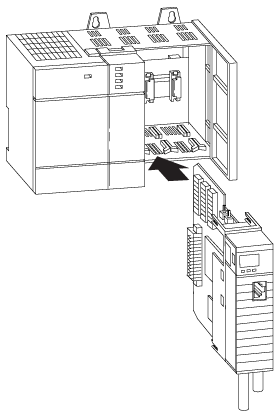
Slide the 1747-SCNR into the chassis guide rails. Ensure the module is aligned with the backplane connectors. - Mechanical Seating
Press firmly on the module faceplate until it is fully seated. Verify that the top and bottom retaining tabs have locked into place. - System Power-Up
Restore power to the chassis. The module will initiate its internal self-test; monitor the status indicators for proper initialization.

Why Choose Amikon for Your Industrial Automation Needs
In this industry, "obsolete" is a concerning word. When a critical PLC fails or a DCS module goes offline, you need reliable solutions and expert support.
Dedicated Account Management
At Amikon, you're paired with a dedicated Account Manager who understands your business needs. They serve as your personal advocate, providing honest, transparent service whether you're sourcing rare components or bulk orders.
Expedited Logistics
We understand that downtime has significant costs. We provide accurate lead times and work with your preferred carriers or find optimal shipping solutions, with real-time tracking for complete visibility.
Global Sourcing Network
We maintain extensive inventory and leverage our global network to source the best prices from manufacturers and suppliers worldwide, ensuring availability and competitive pricing.


